Enerflo Product Announcements

Enerflo is the operating system for residential solar, connecting the tools solar companies already use — design, finance, contracting, CRM — into a single infrastructure. $15+ Billion (and counting) in transactions. One login. One system. One flow for all your solar projects.

APRIL 2026

As the solar market heads deeper into peak selling season, speed and accuracy matter more than ever. Installers are managing more volume, tighter lender requirements, and increasing pressure to get deals right the first time. This month’s updates focus on strengthening the full deal flow—from design through financing to proposal and operations—so data moves cleanly, pricing stays consistent, and teams can move faster without creating downstream issues.

Enerflo Updates & Feature Releases

Solar PV System Design Tools & Apps

Design is where every solar deal starts—and where small gaps turn into downstream issues. These updates focus on improving how design data flows into Enerflo, giving teams more control over configurations, better visibility into key inputs, and more flexibility across tools like Aurora and Scanifly.

AURORA SOLAR DESIGN INTEGRATION UPDATE

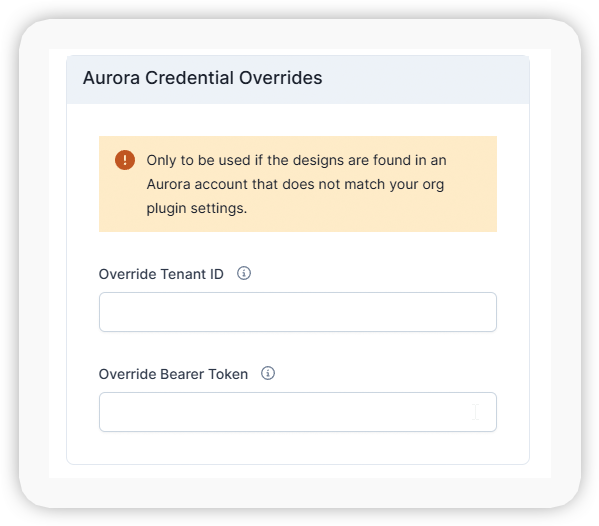
Aurora Solar Integration: Support for Multiple Accounts per Installer

Installers can now connect and manage multiple Aurora accounts within Enerflo. This update supports scenarios like company mergers or account transitions, with an optional override during design tool setup.

Each Aurora configuration can be saved and assigned at the deal template level—giving teams control over which account is used for each project without changing their workflow.


enerflo-product-aurora-solar-multiple-accounts-per-installer

enerflo-product-scanifly-shading-reports-roof-material-mounting-type2
SCANIFLY INTEGRATION UPDATES

Shading Reports Now Included in Design Data

Scanifly shading reports are now included when design data is synced into Enerflo. The reports are accessible via API and webhooks, making it easier to pass shading data downstream into proposals, reporting, or external systems.

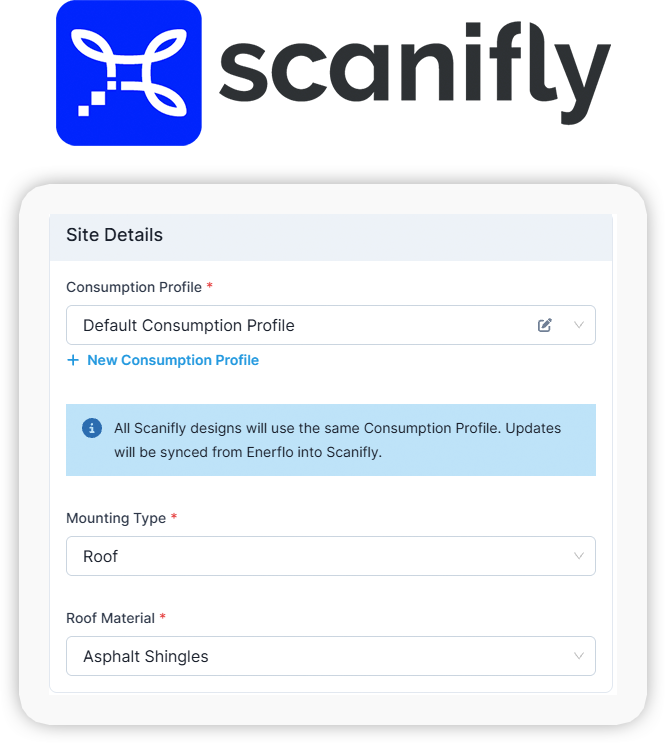
Edit Roof Material and Mounting Type

Users can now update roof material and mounting type directly on Scanifly designs in Enerflo. These updates ensure proposals reflect the correct configuration and allow adders, CRM syncs, and downstream systems to use accurate install data.
 

Solar Finance: Loan, TPO Lease & PPA, Escrow for Cash Deals

Every financing error shows up later—as delays, rework, or lost deals. These updates tighten how Enerflo handles lender rules, pricing logic, and product availability, helping teams submit cleaner applications and keep deals moving forward.

NEW! BATTERY-ONLY LEASE (TPO)

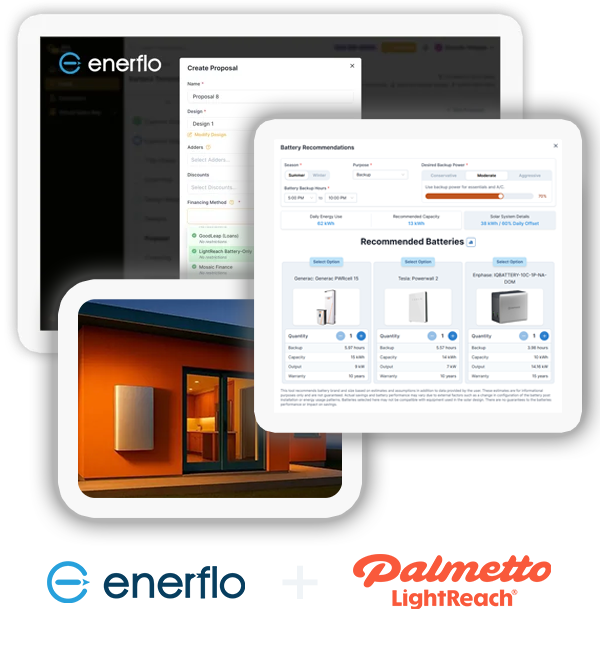
Enerflo + Palmetto Energy Backup for Battery Retrofit

Add energy backup. Add more value. Launch battery retrofit sales with the first battery-only TPO integrated into Enerflo—helping installers monetize their solar install base with subscription-based energy storage financing.

With the Enerflo + Palmetto integration, you can: 

  • Properly size energy storage using Enerflo’s Battery Sizing Tool
  • Offer Battery-Only Lease (Energy Backup)
  • Offer Solar PPA & Lease options
  • Present lease alongside cash and loan options
  • Complete applications without leaving Enerflo
  • Size, price, submit, and confirm in one seamless sales flow
  • Set battery purpose to self-consumption to automatically apply a 20% backup reserve, in line with Palmetto requirements.
Unlock a New Revenue Stream with Your Install Base — with Enerflo + Palmetto Energy Backup.

PALMETTO LIGHTREACH INTEGRATION UPDATE

Control Domestic Content Pricing Display in LightReach Proposals

Installers can now configure whether domestic content pricing appears in Palmetto LightReach proposals. This org-level setting gives teams control over how pricing is presented without changing deal-level workflows.


GOODLEAP TPO INTEGRATION UPDATE

Change Orders Now Use Original Pricing Date (Target Date)

GoodLeap TPO change orders now use the original submission date (“target date”) to determine pricing. This ensures customers receive the same rates they were quoted at the time of sale, even after changes are made.


GOODLEAP TPO INTEGRATION UPDATE

DC/AC Ratio Validation Added to GoodLeap TPO Submissions

GoodLeap TPO proposals now validate DC/AC ratio thresholds before submission. If the ratio exceeds limits, users are guided to make adjustments—helping ensure accurate system design, production modeling, and successful application submission.


SUNGAGE INTEGRATION UPDATE

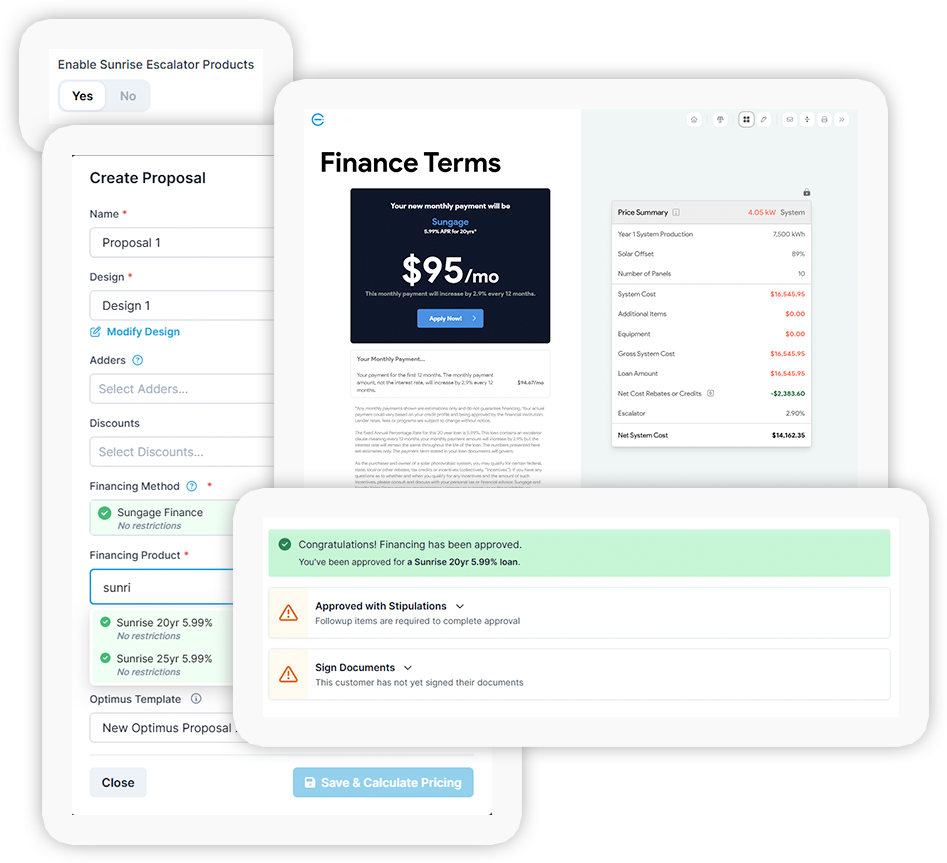
Sungage Sunrise Escalating Loan Products Now Available

Sungage Sunrise escalating loan products are now supported in Enerflo. Installers can include these financing options in proposals, expanding available loan structures for homeowners directly within the workflow.

enerflo-product-sungage-sunrise-escalating-loan-products

enerflo-product-sungage-user-validation-recheck-status
SUNGAGE INTEGRATION UPDATE

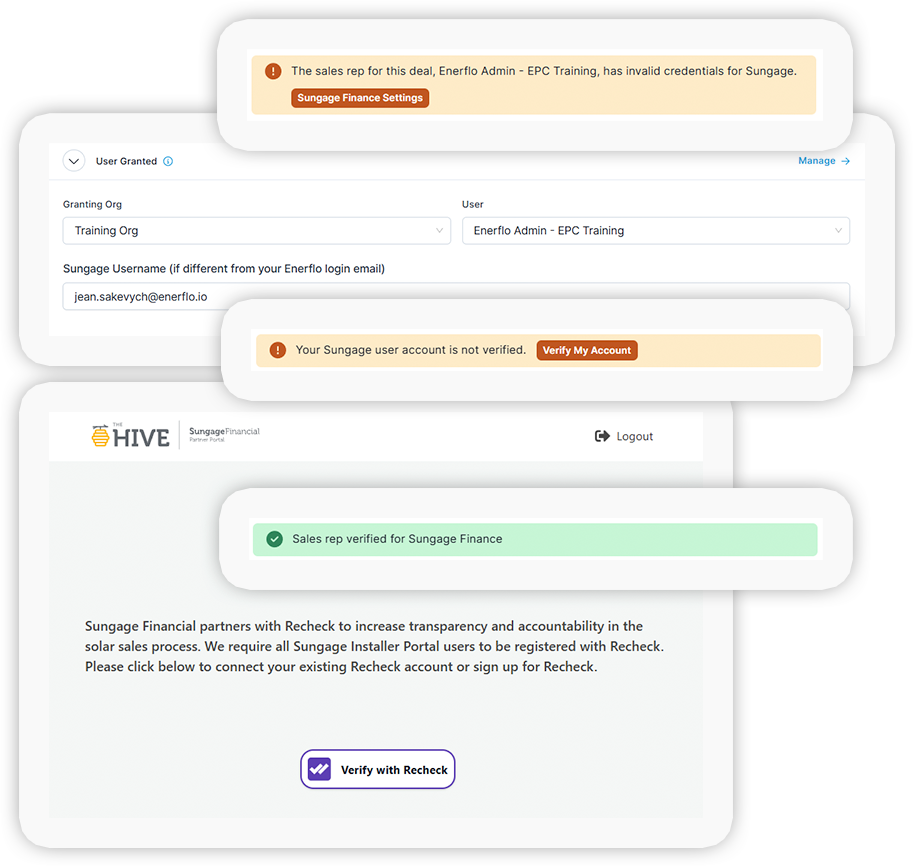
Sungage User Validation Now Includes ReCheck Status

Enerflo now verifies that Sungage users have completed ReCheck validation before allowing submissions. If verification is incomplete, users are directed to complete the required steps—helping prevent delays in financing workflows.


Operating System: New Features & Updates

The Enerflo Operating System is where every part of the deal comes together. These updates focus on improving visibility, control, and day-to-day usability—so teams can move faster, make better decisions, and manage deals without unnecessary friction.

ENERFLO OPTIMUS PROPOSALS UPDATE

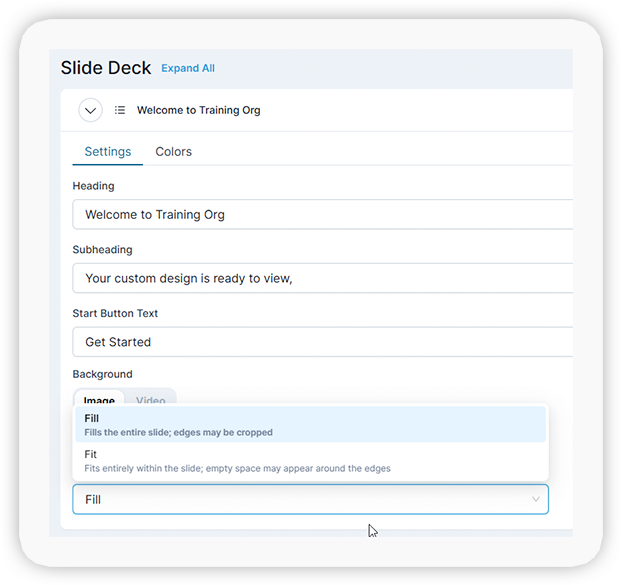
Customize Optimus Proposal Background Images and Colors

Partners can now control background image sizing and color settings for Optimus proposals. These updates make it easier to tailor the first slide customers see—ensuring proposals reflect your brand without changing your underlying workflow.

enerflo-product-optimus-proposal-bkgd-images-colors

enerflo-product-palmetto-lightreach-post-solar-utility-cost
ENERFLO OPTIMUS PROPOSALS UPDATE

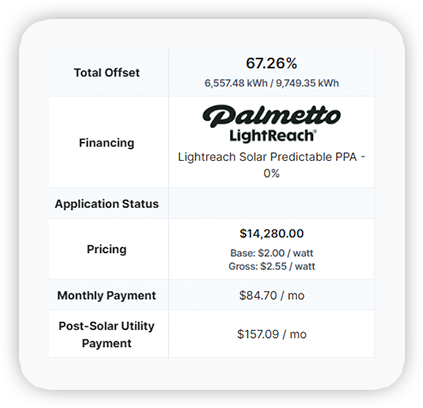
Post-Solar Utility Cost Now Displayed on Proposal Cards

After running the savings forecast, Enerflo now displays the average post-solar utility cost directly on proposal cards. This gives teams a faster way to compare proposals and communicate expected savings without opening each option.


ENERFLO OPTIMUS PROPOSALS UPDATE

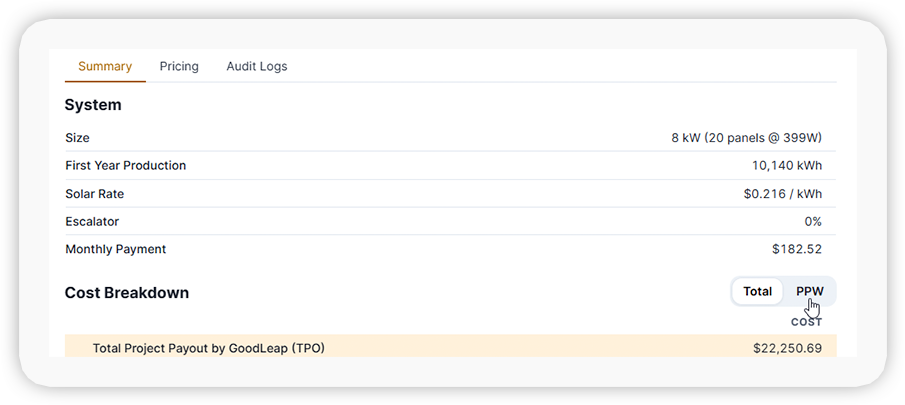
Toggle Between Total Cost and Price Per Watt in Optimus Editor

The Optimus proposal editor now includes a toggle to switch between total system cost and price per watt (PPW). This simplifies the editing experience by showing one value at a time while keeping both metrics easily accessible.

enerflo-product-optimus-proposals-toggle-cost-ppw

enerflo-product-optimus-proposals-view-consumption-utility-data
ENERFLO OPTIMUS PROPOSALS UPDATE

View Consumption and Utility Data in Optimus Proposal Editor

Consumption profile and utility data are now displayed directly within the Optimus proposal editor. This gives users a clearer view of usage and rate assumptions—making it easier to compare proposals and validate savings at a glance.


ENERFLO OPTIMUS PROPOSALS UPDATE

New “Energy Cost Projection” and “Solar Solution Benefits” Slides

Two new default slides are now available in Optimus proposals (English and Spanish). “Energy Cost Projection” shows current and projected utility costs based on escalator assumptions and can replace the existing bill slide. “Solar Solution Benefits” is designed for TPO projects, comparing current costs, payments, and savings before and after solar to help clearly communicate value to homeowners.

enerflo-product-optimus-proposals-new-slides-cost-projection1
1 New Optimus Proposals Slide: Your Energy Cost Projection
enerflo-product-optimus-proposals-new-slides-solar-benefits2
2 New Optimus Proposals Slide: Your Solar Solution Benefits

enerflo-operating-system-internal-only-change-orders
ENERFLO OPERATING SYSTEM UPDATE

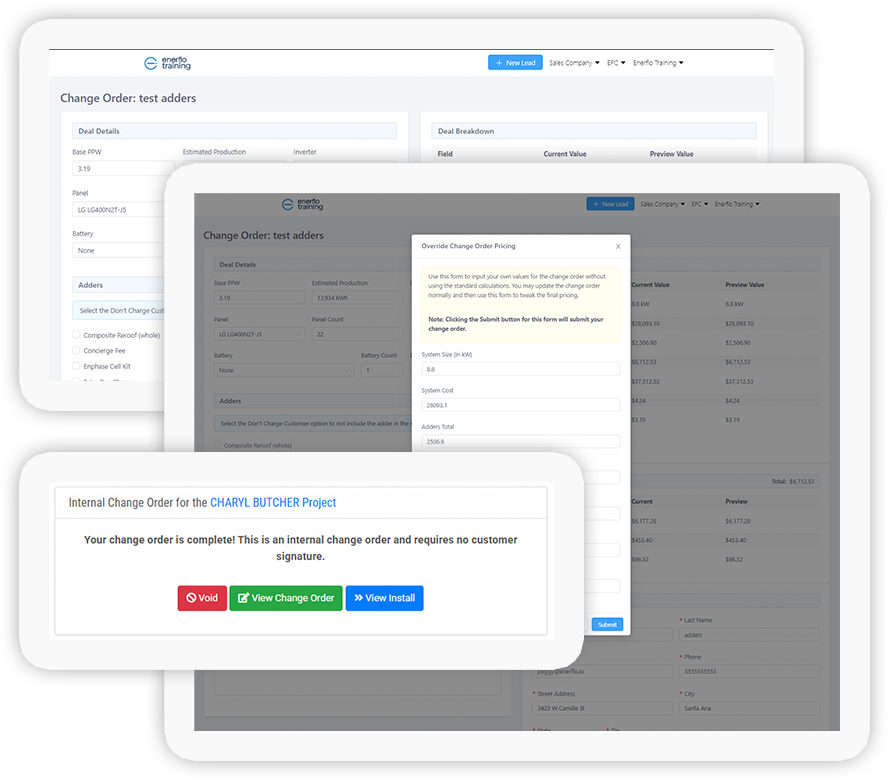
Create Internal-Only Change Orders Without Customer Signature

Users can now create change orders that do not require customer signature. This supports internal updates and corrections without generating a new addendum—keeping deal workflows moving while maintaining accurate project records.


ENERFLO OPERATING SYSTEM UPDATE

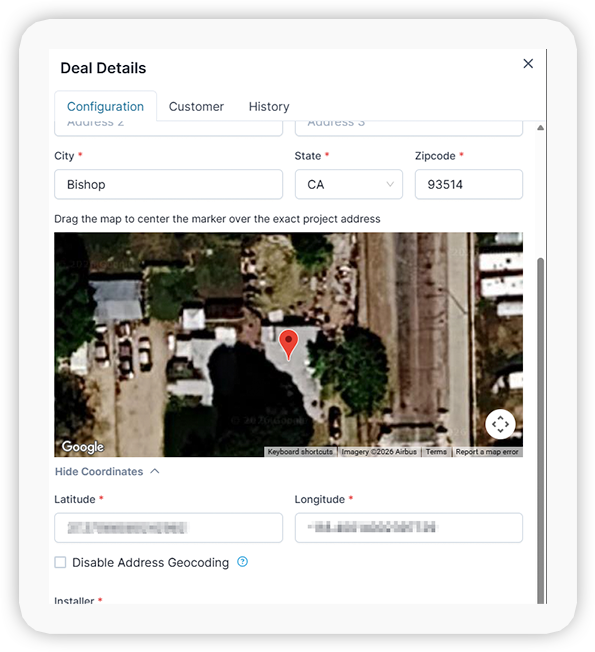
Override Google Maps Geocoding with Manual Latitude and Longitude

Users can now manually set latitude and longitude for a project address, overriding Google Maps geocoding when needed. This is especially useful in regions where mapping data is inconsistent, helping ensure accurate project location data across the deal.

enerflo-operating-system-override-google-maps-geocoding

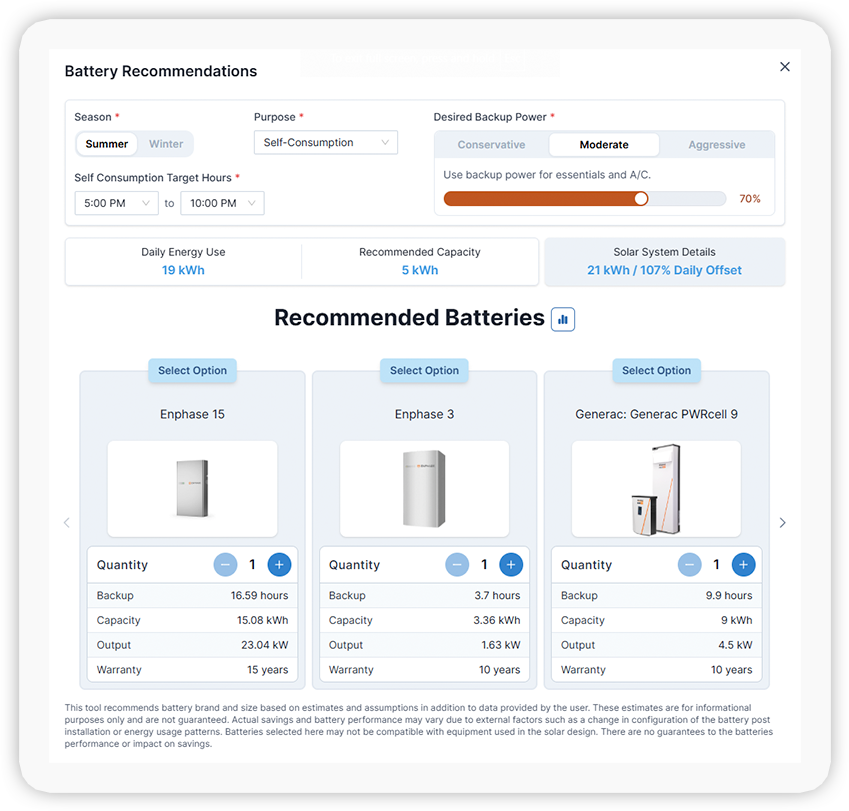
enerflo-operating-system-battery-sizing-tool-design-stage
ENERFLO OPERATING SYSTEM UPDATE

Battery Sizer Now Available in Design Stage

The battery sizer tool is now available directly in the Design stage of Enerflo. Users can generate battery sizing recommendations for all deal types—including TPO and battery-only—across both integrated and non-integrated design sources.


ENERFLO OPERATING SYSTEM UPDATE

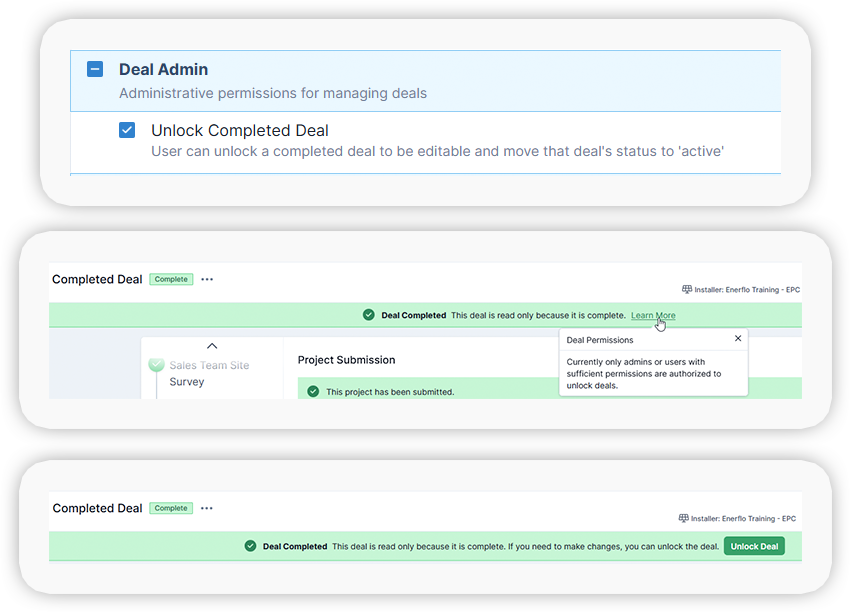
Unlock Completed Deals with New Permissions Control

Admins can now grant permissions to unlock deals in a Completed status for editing. This removes the need to contact Enerflo Support and gives teams more direct control over post-completion updates.

enerflo-operating-system-unlock-completed-deals-new-permissions-control

ENERFLO OPERATING SYSTEM UPDATE

New Adder Presets for Mounting, Roof Type, Panel Count, Finance, and Pitch

Admins can now use preset conditions to control when adders apply to proposals. Supported criteria include mounting type, roof material, panel count thresholds, finance method, and roof pitch—making it faster to configure accurate, rule-based pricing across deals.

ENERFLO OPERATING SYSTEM UPDATE

Demand Charges Now Included in Average Utility Rate Calculations

Consumption profiles now account for demand charges when calculating average utility rates. If a selected utility tariff includes demand-based pricing, it will be reflected in both pre- and post-solar cost assumptions—improving savings accuracy.

ENERFLO OPERATING SYSTEM UPDATE

Deals Now Reopen to Your Last Active Stage

When returning to a deal, users are now taken to the last stage they worked in. This device-specific behavior makes it easier to pick up where you left off without manually navigating through the deal flow.

Get Help & Support

The Enerflo Support Team is at your service!

Enerflo Support Hours

Enerflo Platform Support Hours
Monday - Saturday*(Closed Sundays)

6:00am - 7:00pm PT (9:00am - 10:00pm ET)

Aerialytic Design Support Hours
Monday - Saturday*
6:00 AM - 9:00 PM PT (9:00am - 12:00am ET)
Sundays*
8:00 AM - 4:00 PM PT (11:00am - 7:00pm ET)

Email Enerflo Support
If/when Chat Support isn't available
support@enerflo.com  

*Holiday hours may vary

Enerflo Chat Support & Training Resources

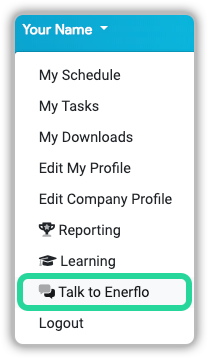
Enerflo Chat Support is the fastest and easiest way to get help with Enerflo.

With fast response and resolution times, the Enerflo Support Team is here to help you get unstuck and on with your day as quickly and efficiently as possible!

Access on-demand training and support content from Chat as well.

enerflo-chat-support-menu

Enerflo Helps Installers Reduce Their Project Duration

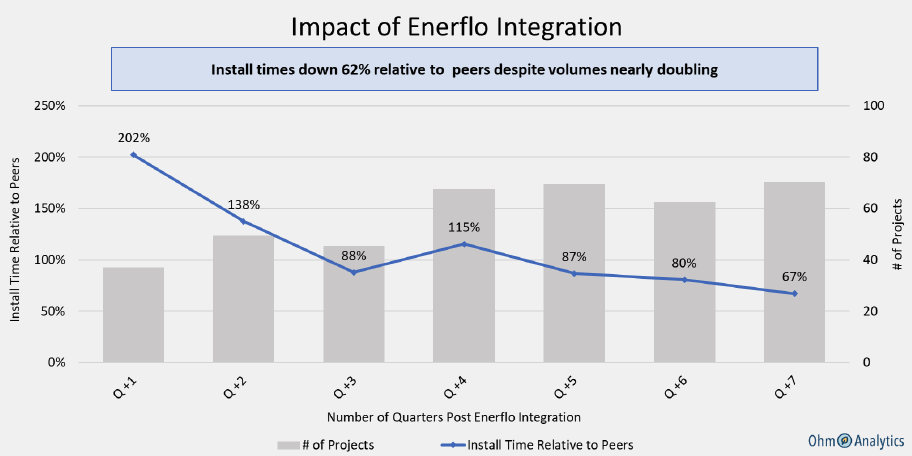
Enerflo Partners' Install timelines down 62% relative to peers despite volumes almost doubling

Ohm Analytics, a 3rd party organization, conducted a case study to measure the impact of Enerflo on install timelines. Enerflo helps create efficiencies for these organizations that enable them to both shrink their install timelines and increase their volume.

Ohm Analytics: Enerflo partners' install timelines down 62% relative to peers despite volumes almost doubling.

Thank you for your interest! See you again next month.