Enerflo Product Updates
New Product Updates Across Solar Design & Finance Integrations, and the Enerflo Operating System
NOVEMBER 2026
In November 2026, Enerflo updated the workflows residential solar teams use to review designs, submit financing applications, and hand off projects. The Design Request Queue now separates work in progress from designs awaiting rep approval. Installers can enable on-device EnFin TPO applications, and Thrive Power proposals now check utility eligibility before reps can create a proposal. Enerflo also expanded Battery Sizer model support and added solar design images to project handoff webhooks.
Product Updates in Solar Design
Enerflo’s Design Request Queue now makes it easier to see which solar designs are still in progress and which are ready for rep approval. Solargraf updates make it easier to assign projects to reps, correct mounting types or roof materials, and open the right design directly. Scanifly messages clarify who needs to act on an incomplete design, while Aerialytic onboarding now requires less manual setup and retired fields have been removed from the Aurora Solar integration.
Enerflo Design Request Queue Separates In-Progress Designs from Rep Approvals
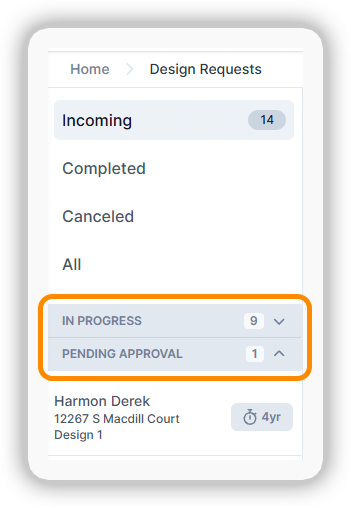
Designers can now see in-progress requests and completed designs awaiting sales rep approval in separate sections of the Enerflo Design Request Queue. Both sections can be expanded or collapsed, making it easier to find the requests they need.
Assign Solargraf Projects to Sales Reps from the Enerflo Design Queue
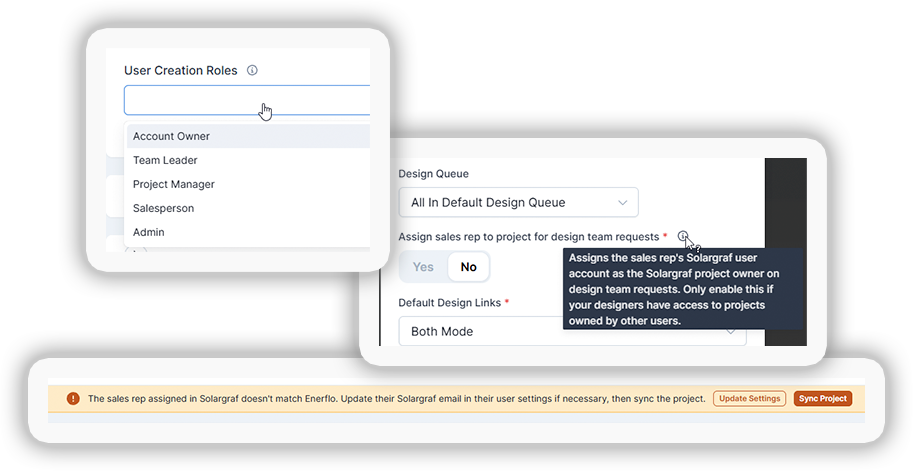
Partners who use a design team to fulfill Solargraf requests through Enerflo can now choose to have the resulting projects assigned to the requesting sales reps in Solargraf. Partners can also configure invitations with specific Solargraf user roles for reps who don’t have an account.
Edit Mounting Type and Roof Material on Solargraf Designs
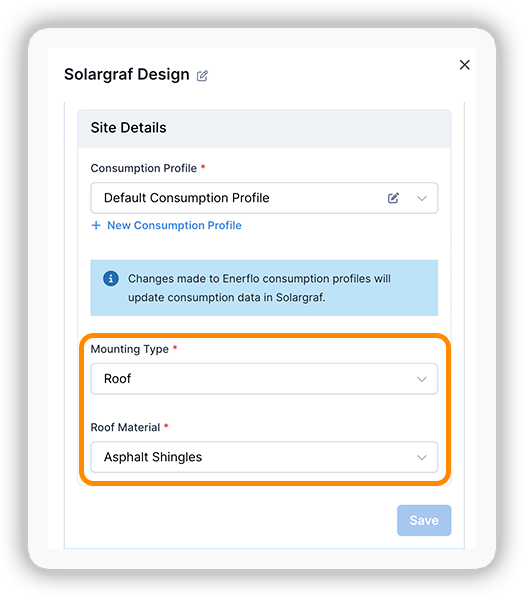
Sales reps can now use Modify Design in Enerflo to correct the mounting type or roof material on a Solargraf design when either detail was entered incorrectly in the original request.
Open the Design Page Directly from Enerflo
Clicking View In Solargraf in Enerflo now opens the design page for that project in Solargraf, saving users a navigation step.

Retired Fields Removed from the Aurora Solar Integration
As previously announced, Enerflo removed fields from earlier versions of the Aurora Solar integration that had stopped working.

Faster Aerialytic Onboarding with Automated Configuration
Enerflo now automates much of the configuration for partners who sign up to use Aerialytic through Enerflo, reducing manual setup and helping teams get started sooner.
Scanifly Design Messages Clarify Who Needs to Take Action
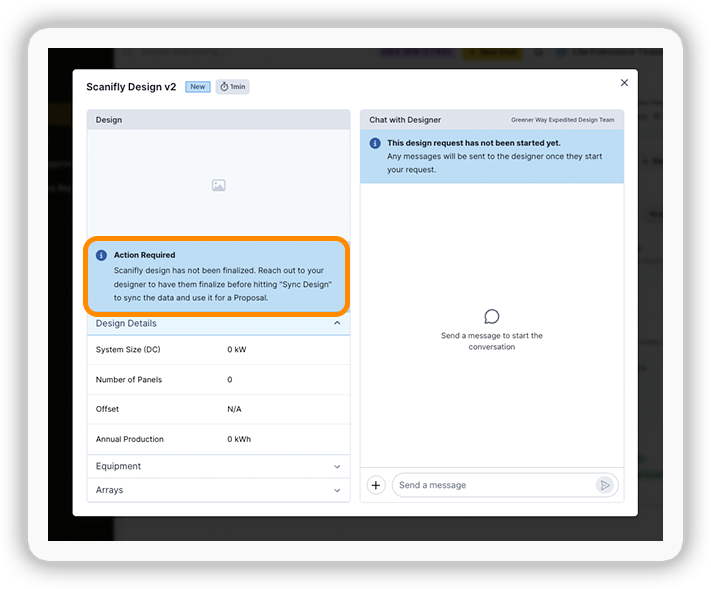
When a Scanifly design is incomplete, Enerflo now gives sales reps clearer guidance on who needs to take the next step. The message indicates whether the rep needs to act or whether the remaining work belongs to a designer.
Product Updates in Solar Finance
November’s solar financing updates cover IGS quotes and dealer setup, EnFin TPO application options, and GoodLeap TPO application recovery. Installers can now control EnFin TPO availability through Finance Product Targeting rules, while Thrive Power updates add earlier proposal checks and support for prepaid PPA documentation and Texas welcome calls.
IGS Solar Proposals Get Updated Equipment Images
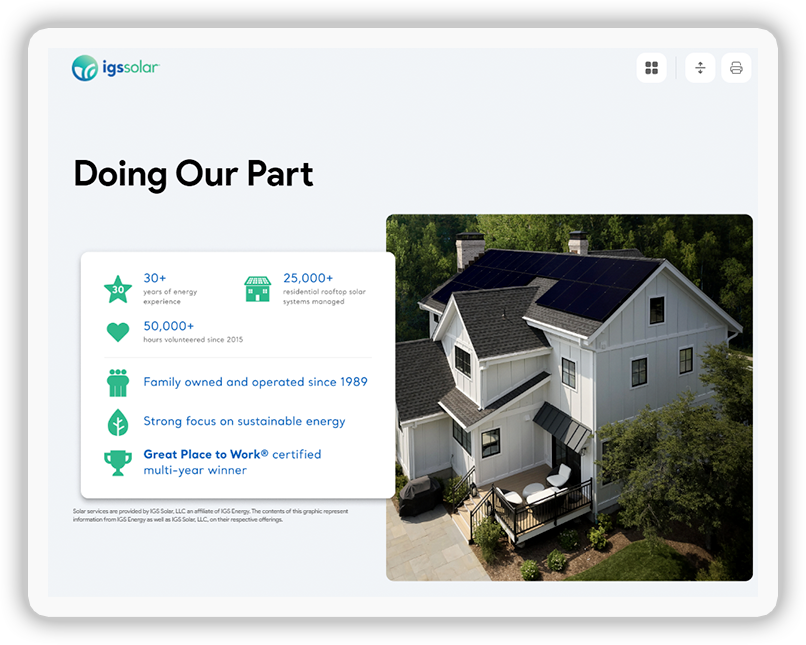
IGS proposals in Enerflo now feature updated images that better reflect what current solar equipment looks like.
Select IGS Sales Partner Codes from a Dropdown
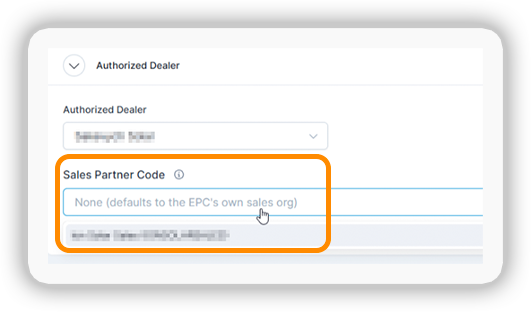
When linking an Enerflo authorized dealer to an IGS sales partner code, users can now select the code from a dropdown. This eliminates manual entry and prevents typos during dealer setup.
Enerflo Automatically Disqualifies the Oldest IGS Quote After Five
When revisions to an IGS proposal generate more than five quotes in the IGS portal, Enerflo automatically disqualifies the oldest quote. This keeps outdated quotes from remaining active and helps prevent errors as new quotes are created.

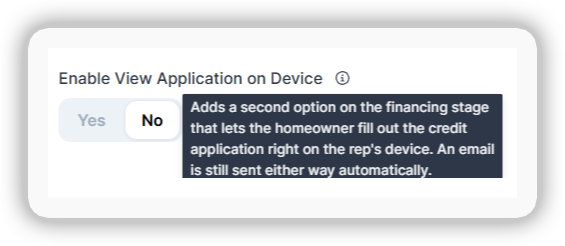
Enable On-Device EnFin TPO Applications for Sales Reps
Installers can now enable sales reps to submit EnFin TPO applications directly from their devices. This gives installers another option alongside the emailed application workflow for homeowners.

EnFin TPO Checks for Duplicate Email Addresses Earlier
Enerflo now verifies earlier in the sales workflow that the primary applicant, co-signer, and sales rep each have a unique email address. Reps can resolve duplicate addresses before submitting the EnFin TPO application.
EnFin TPO Address Prefill Avoids Duplicate Information
Enerflo now prefills address fields differently when sending information to EnFin TPO, preventing duplicate address details in the application.
EnFin TPO Now Supports Finance Product Targeting
Installers can now include EnFin TPO products in Enerflo’s Finance Product Targeting rules to control when those financing options are available in their sales workflow.
GoodLeap TPO Restores Canceled Applications That Homeowners Continued
Enerflo admins can now restore a GoodLeap TPO application even if the homeowner continued it after a sales rep canceled it in Enerflo.

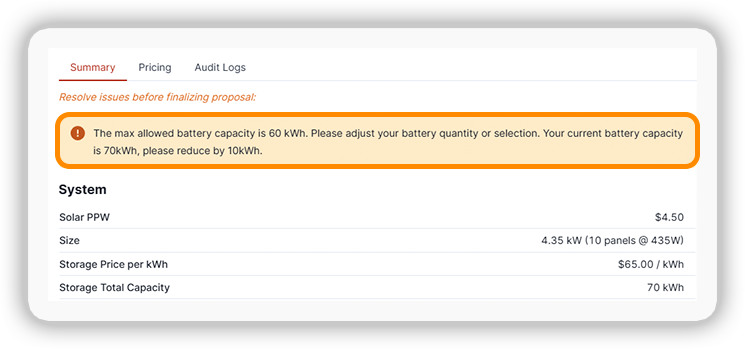
Thrive Power Proposals Flag Solar System Size and Battery Capacity Limits
Enerflo now alerts sales reps during the Thrive Power proposal process if a design exceeds the maximum allowed solar system size or battery capacity. Reps can adjust the design before moving forward.
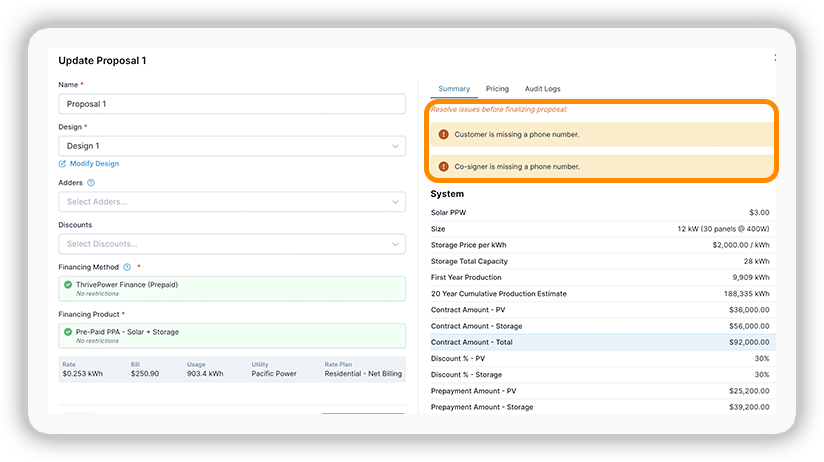
Thrive Power Checks Contact Phone Numbers Before Proposal Finalization
Before a Thrive Power proposal can be finalized, Enerflo checks for phone numbers on file for the customer and any other contacts on the deal. This surfaces missing contact information earlier in the sales process.
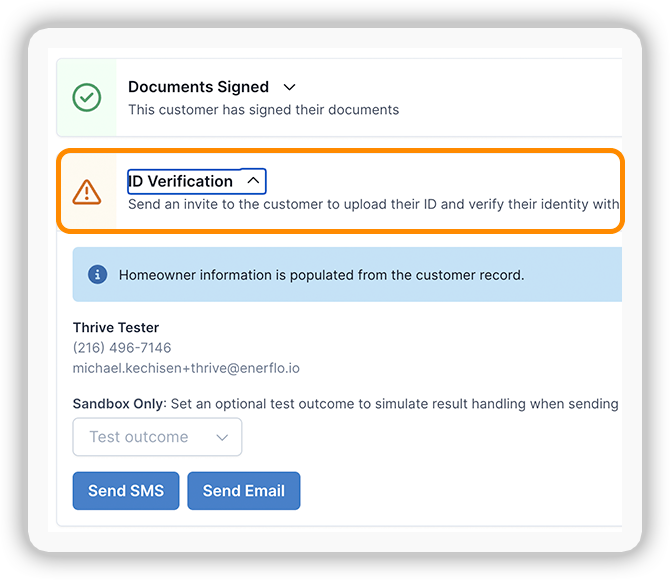
Thrive Power Adds Integrated Driver’s License Verification
Sales reps can now use Enerflo’s integrated driver’s license verification to verify a customer’s identity during the Thrive Power sales workflow.

Thrive Power Checks Utility Eligibility Before Proposal Creation
If a customer’s electric utility is ineligible for Thrive Power, Enerflo alerts the sales rep and blocks proposal creation. Reps can confirm utility eligibility before building a proposal.
Enerflo Auto-Fills Thrive Power’s Oversizing Attestation
In markets that require an Oversizing Attestation for Thrive Power Prepaid PPA sales, Enerflo automatically gathers the required information and populates the document.
Thrive Power Updates Texas Agreement Packets, Welcome Calls, and Licensing
The Thrive Power agreement packet for Texas now includes the Texas Customer Brochure, and the welcome call script includes required questions about the prepayment amount and payment method. Sales reps and their organizations must also have their Texas licenses set up in Enerflo to sell Thrive Power in the state.
Enerflo Operating System (OS) Updates
Enerflo now supports middle initials in Title Check, automatically inserts sales rep details into configured deal template fields and custom URLs, and supports more battery models in Battery Sizer. Installer admins can also unlock completed, read-only deals from authorized dealers, and connected systems can receive the proposal’s solar design image through project handoff webhooks. For help with Enerflo’s API and integrations, visit Enerflo’s API Documentation.
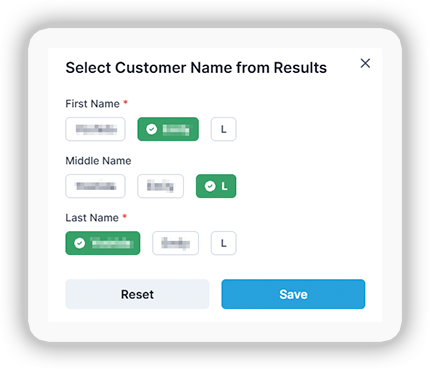
Enerflo Title Check Now Supports Middle Initials
Sales reps can now enter a middle initial when running a Title Check in Enerflo, giving them another way to specify whose name to check on the property title.
Auto-Fill Sales Rep Details in Deal Templates and Custom URLs
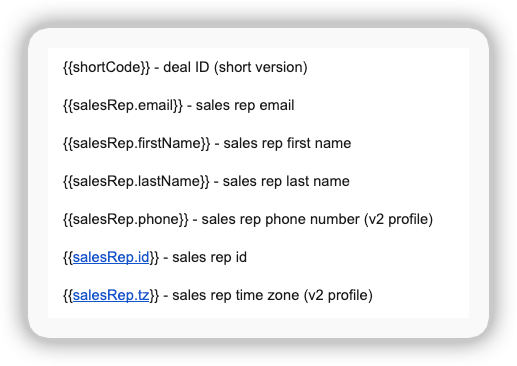
Enerflo now supports Handlebars expressions for the sales rep’s name, contact information, and Enerflo ID. Partners can use these expressions to automatically populate deal template fields or custom URLs with the rep’s details.

Enerflo Battery Sizer Supports More Battery Models
Enerflo increased the number of battery models its Battery Sizer can handle, giving installers with larger battery catalogs more room to configure their offerings. The higher limit applies in both Optimus Proposals and the Design stage.
Installer Admins Can Unlock Completed Deals from Authorized Dealers
When a completed deal from an authorized dealer needs to be revisited, org admins for the installer assigned to the deal can now remove the read-only lock directly in Enerflo.
Enerflo Project Webhooks Now Include the Solar Design Image
The Deal Project Submitted and Deal Project Received webhooks now include the image from the solar design used in the deal’s proposal. Connected systems can receive that image as part of the project handoff.
For help, visit Enerflo’s API Documentation
Get Help & Support
The Enerflo Support Team is at your service!
Enerflo Support Hours
Enerflo Platform Support Hours
Monday - Saturday*(Closed Sundays)
6:00am - 7:00pm PT (9:00am - 10:00pm ET)
Email Enerflo Support
If/when Chat Support isn't available
support@enerflo.com
*Holiday hours may vary
Enerflo Chat Support & Training Resources
Enerflo Chat Support is the fastest and easiest way to get help with Enerflo.
With fast response and resolution times, the Enerflo Support Team is here to help you get unstuck and on with your day as quickly and efficiently as possible!
Access on-demand training and support content from Chat as well.
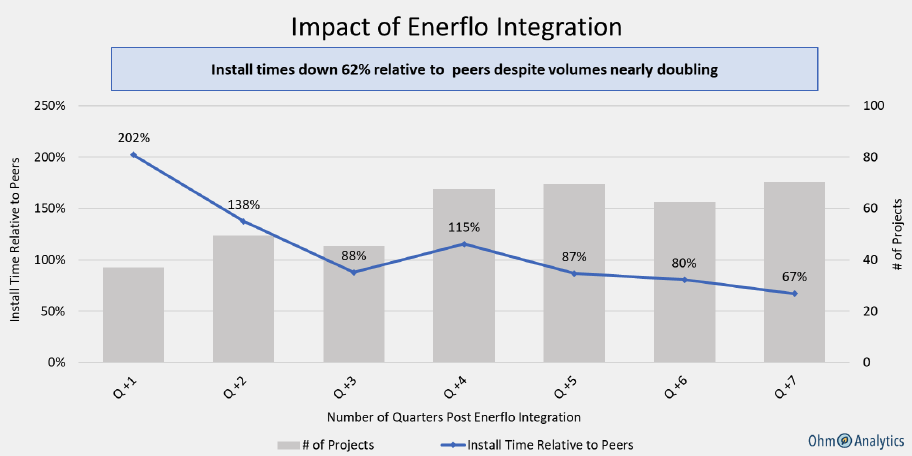
Enerflo Helps Installers Reduce Their Project Duration
Enerflo Partners' Install timelines down 62% relative to peers despite volumes almost doubling
Ohm Analytics, a 3rd party organization, conducted a case study to measure the impact of Enerflo on install timelines. Enerflo helps create efficiencies for these organizations that enable them to both shrink their install timelines and increase their volume.